Light Painting Photography

For the promotion and progression of Light Painting Art and Artist.

  • Home
  • Blog
  • History
  • Artists
    • Dean Chamberlain
    • Eric Staller
    • Susan Sims-Hillbrand
    • Vicki DaSilva
    • David Lebe
    • Troy Paiva
    • Bruno Mesrine
    • Chanette Manso
    • Patrick Rochon
    • Aurora Crowley
    • LAPP-PRO
    • JanLeonardo
    • Lightmark
    • Arturo Aguiar
    • Pete Eckert
    • Trevor Williams
    • Michael Bosanko
    • Jason D. Page
    • Nocturne
    • Brian Hart
    • Jeremy Jackson
    • Janne Parviainen
    • Jadikan-LP
    • Dana Maltby
    • Lichtfaktor
    • Dennis Calvert
    • TigTab
    • Hannu Huhtamo
  • Tools
    • Light Painting Brushes Starter Kits Introduction
    • Fiber Optics Light Painting Tools for Photography
  • Tutorials
    • Beginner Light Painting Tutorials
    • Light Painting Tutorials by Artists
    • Light Painting Tool Tutorials
    • Kinetic Light Painting Tutorials
    • Light Painting with Fire Tutorials
    • How To Light Paint A Flower
    • Light Painting Photography Tutorial: The Spiked Orb
    • How To Light Paint a Faberge Orb!
    • No More Orb Feet – Light Erases Darkness
    • The Tinfoil Light Painting Technique
    • How To Light Paint A Ghost
    • Electric Orb Light Painting Tutorial
    • Spirographs and Physiograms Tutorial
    • On Camera Light Source
    • Off Camera Light Source
    • Orb Techniques
    • Steel Wool Tutorial
    • Custom White Balance
    • Omnidirectional Light Cap
    • Gel Holder
    • Simple Orb Tool
    • 4 Ways to Add Color to your Plexiglass Light Painting Brushes
    • Driving Shots at Night
    • Wire Wool Spinning
    • El Wire Tutorial
    • Light Stencils
    • Orbs
    • Dome Tutorial
    • Battery Operated Cathode
    • Light Wheel
    • Double Wheel
    • Fire Wall Tutorial
    • Fire Rain Tutorial
    • Smoke
    • How To Light Paint with the Polaroid One Step +
    • How To Focus In The Dark
    • Light Painting Tutorial The Peacock Technique
    • How To Shoot Defocused Fireworks Tutorial
    • Drone Light Painting Tutorial
    • Light Stencil By Trevor Williams
    • Andrew Whyte Dome Tutorial
    • Light Painting Workshop by Patrick Rochon
    • Rob Turney Refractographs
    • SpiroJib by Johnny Griffin
    • Lens Swap Light Painting Tutorial
    • Camera Rotation Light Painting Tutorial
  • Videos
    • Light Painting Documentaries
      • Jason D. Page Documentary
      • Ball of Light
      • Night Photography: Finding Your Way In The Dark
      • Lightpainted Reality
      • SeeMe | In Focus : Pete Eckert
      • Pete Eckert – Dancing on The Edge of Perception
    • Dean Chamberlain
    • Vicki DaSilva
    • Patrick Rochon
    • Lichtfaktor Light Painting Videos
  • Terms
  • Links
  • Connect With Us!
  • About
You are here: Home / Blog

Light Painting Tutorial, Spirographs with a Twist

May 28, 2020 by Jason D. Page

Light Painting Photography Tutorial

Light Painting Photographer Erin Simmons has recently published a new Light Painting Tutorial showing how he has been creating his extraordinarily unique spirograph light paintings and I am so glad he did! When Erin first posted his spirographs I was amazed, if you are familiar with light painting you have probably seen numerous spirographs but Erin’s are DIFFERENT! When someone in our community creates something unique and not seen before that is exciting! As a light painter of course I want to try to figure out HOW? I tried a few different times and I couldn’t figure it out, in a strange way that also makes me happy… Thankfully, in the true spirit of light painting, Erin has shared his technique with us! The name of this post says it all, its a simple addition to creating a “normal” spirograph and that is to TWIST the hanging light before you spin it! Erins technique is another great example of a simple twist creating extraordinary images! Check out the tutorial Erin made below and make sure to give him a follow on Instagram @eelskie


New to Light Painting Spirographs? Then check out this tutorial that might help!

Filed Under: Light Painting Photography, Light Painting Tutorials, Light Painting Video

Light Painting Photograph Contest Winner May 2020

May 5, 2020 by Jason D. Page

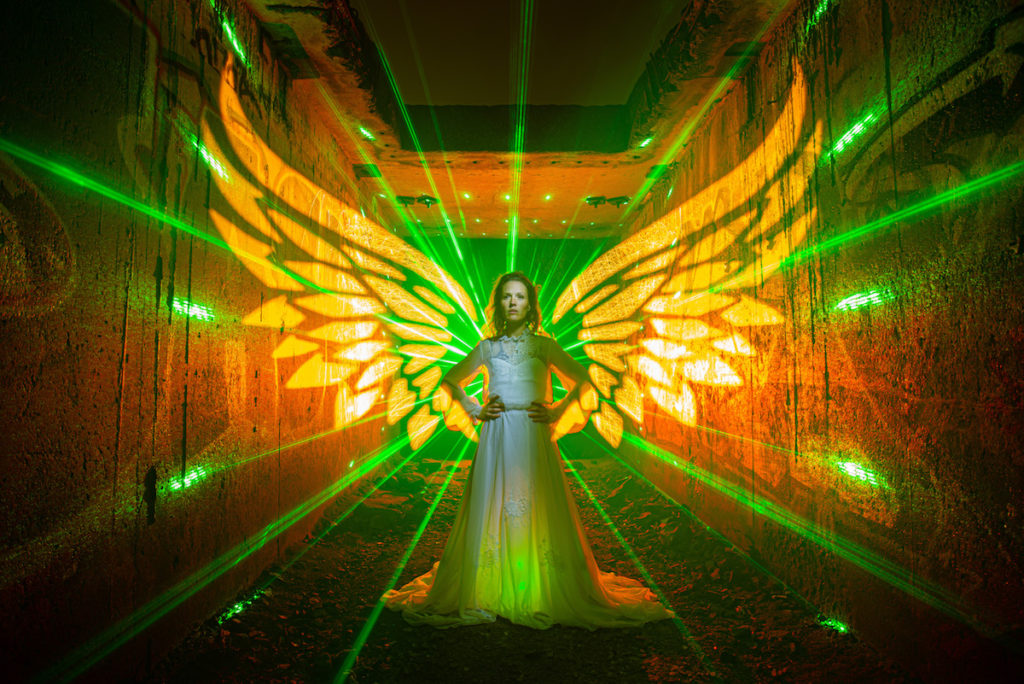
Light Painting Wing Contest The winner of the Light Painting Photography Contest for May 2020 is… Kim Von Coels for the image you see above! Kim took a unique approach to creating her wings for this winning image read on to see exactly how it was done!

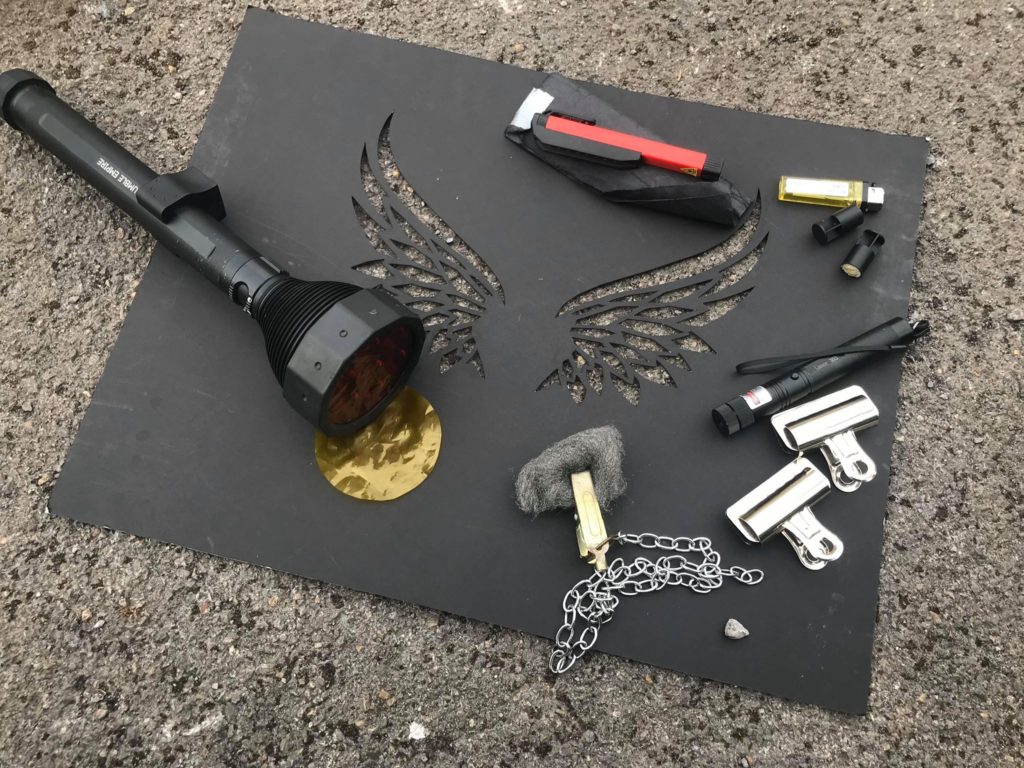
Tools Needed:
Camera on tripod with cable release.
Stencil on stand with clips Laser on stand.
Smoke pellets and lighter.
Steel wool.
With a chain and clip for spinning.
Portrait scanner.
Or small handheld flash for front light.
Strong torch for backlight with coloured filters.
I used a LedLenser xr21.2 and some hand cut gels.
Fantastic model
Assistant (if you have one) in this case it was Phill Fisher

Light Painting Tools For Shot

How to: Firstly you need to line up all the elements of your shot. Laser at the very back on a stand. Model in the centre. With plenty of space between the model and the laser so you can spin the steelwool. Stencil stand infront of the camera. I attach my stencil with clips to the stand so I can swing it in and out of the shot.

Light Painting Diagram
Light Painting Set Up

Then I compose my shot. Make sure the model is central. I use the focus box in the view finder so I know its exactly right. I then focus on the model and turn my focus to manual. I mark the ground where the model is standing so I don’t always need to refocus.
Once everything is lined up and in focus I bring the stencil in and line it up in my viewfinder. I know where the model is because of the focus box. When the stencil is in shot I cannot see the model so its important to have a reference so I can line the stencil up with the model perfectly.

Once everything is ready the process is as follows:
1. Start exposure using bulb mode and shutter release cable.
2. Steel wool spun behind the model.
3. Backlight with yellow filter shone onto the walls to fill the rest of the stencil where the steel wool didn’t reach (in my case we shot in a tunnel so the steel wool bounced off the walls and didn’t reach the tips of the wings)
4. Move stencil out of the way.
5. Backlight model with red filter.
6. Front light the model either with a portrait scanner or little hand held flash.
7. Light smoke pellet and fill area with smoke to make the laser beams stand out in the picture.
8. End exposure.
Repeat until all elements if the picture are satisfactorily balanced. In my case i think we did about 20 attempts before we were truly happy. Pro tip: be fussy!!!! Dont be satisfied unless its perfect. Do it again. Persistence pays off.

Light Painting With Wings Kim Von Coels 01
Light Painting With Wings Kim Von Coels
Light Painting With Lasers Kim Von Coels
Light Painting With Wings Kim Von Coels 02

For this winning Image Kim will receive a prize package filled with light painting tools and treasures from our sponsors COAST Flashlights, Neon Flexible, Rosco and Light Painting Brushes ! Please support these awesome companies that support our light painting art from, without them this contest series would not be possible! If you would like to enter the next Light Painting Photography contest click here for all the details.

Light-Painting-Brushes-Banner
Rosco Labs Logo

Filed Under: Light Painting Contest, Light Painting Contest Winner, Light Painting Photography

LightMonster – Video Light Painting Software for FREE!

May 4, 2020 by Jason D. Page

LightMonster Video Light Painting Software

Light Painting Photographer and all around creative genius Dan Roberts has decided to release his Real Time Video Light Painting Software to the world FOR FREE! LightMonster has been around for years but its now open-source and free for all non-commercial use. If you want to use the software for commercial work then its on a honor based donation system, so if you use it to make money don’t be a jerk and give a little back to Dan for his work that went into creating this software and then giving it to you for freeeee… Below is a short demo video, to download the software and for all the info go to TheLightMonster.com 

Also don’t forget to throw a Thank You to Dan on his Facebook or Instagram pages.

LightMonster 5-18-2017.3 from Dan Chick Roberts on Vimeo.

Filed Under: Light Painting Photography, Light Painting Video

New Light Painting How To Book by David Gilliver

May 1, 2020 by Jason D. Page

Light Painting Book Cover

Light Painting Photographer David Gilliver has launched a new and improved version of his Interactive E-book “A Step by Step Guide To Light Painting”! David has been sharing his passion for the light painting art form for years and he has compiled his wealth of knowledge and experience into his new 72 page book that is packed with Light Painting information! I’ve had a sneak peak at the book (and a page or two included) and I think its really well done. This book is geared toward the newer light painter but even if you have a ton of experience there are some tricks in there for you too! If you would like to check it out and get a copy for yourself you can do that right HERE.

Here is what you will find in David’s updated book!

Expanded & Updated for 2020

My new interactive Ebook on Light Painting Photography is now ready to share with the world. It is packed full of new content including:

  • New clean page layout and design
  • An expanded camera gear and light painting tools section
  • 17 chapters of techniques and advice
  • A special chapter featuring 3 of the best Light Painters on the planet and the tools they make
  • A bonus online gallery showcasing over 50 stunning Light Paintings from the book
  • Information about my Light Painting Workshops
  • And much much more…

Light Painting Book Back Cover

Filed Under: Light Painting Photography

Light Painting Contest Entries, April 2020

April 28, 2020 by Jason D. Page

Light-Painting-Photogrpahy-Wing-Contest

Here are the entries for this months Light Painting Photography contest! The theme of this light painting competition was WINGS. Everyone PLEASE VOTE in the comment section of this page to pick your TOP 3 favorite images, ONLY VOTE ONE TIME. Please pick the 3 different images you love based on the images alone and leave your selections in the comment section of this page. The images all have a number in the title (EXAMPLE… IF ONE OF YOUR FAVORITES IS THE IMAGE TITLED “Light Painting Photography Contest 01″ THEN YOU SHOULD PUT THE NUMBER 01 AS ONE OF YOUR CHOICES). Voters must include 3 UNIQUE choices for your votes to be counted. In other words no 1,1,1, or 5,5,5, or 7,7,7,…..The voting will end 05/02/2020 at Midnight Eastern Standard Time, Enjoy.

Light Painting Photography Wings
1
Light Painting Wing Contest 02
2
Light Painting Wing Contest
3
Light Painting Wing Contest
4

Light Painting Wing Contest
5
Light Painting Wing Contest
7
Light Painting Wing Contest
8

Light Painting Wing Contest
9
Light Painting Wing Contest
10
Light Painting Wing Contest
11
Light Painting Wing Contest
12

Light Painting Wing Contest
13
Light Painting Wing Contest
14
Light Painting Wing Contest 15
15

As always this Light Painting Photography contest is sponsored by the coolest damn companies on the Planet COAST Flashlights, Neon Flexible, Rosco and Light Painting Brushes ! Please support these awesome companies that support our light painting art from, without them this contest series would not be possible!

Light-Painting-Brushes-Banner
Rosco Labs Logo

Filed Under: Light Painting Contest, Light Painting Photography Tagged With: Light Painting, Light Painting Contest, Light Painting Photography

« Previous Page
Next Page »

Copyright © 2026 · News Pro Theme on Genesis Framework · WordPress · Log in