Light Painting Photography

For the promotion and progression of Light Painting Art and Artist.

  • Home
  • Blog
  • History
  • Artists
    • Dean Chamberlain
    • Eric Staller
    • Susan Sims-Hillbrand
    • Vicki DaSilva
    • David Lebe
    • Troy Paiva
    • Bruno Mesrine
    • Chanette Manso
    • Patrick Rochon
    • Aurora Crowley
    • LAPP-PRO
    • JanLeonardo
    • Lightmark
    • Arturo Aguiar
    • Pete Eckert
    • Trevor Williams
    • Michael Bosanko
    • Jason D. Page
    • Nocturne
    • Brian Hart
    • Jeremy Jackson
    • Janne Parviainen
    • Jadikan-LP
    • Dana Maltby
    • Lichtfaktor
    • Dennis Calvert
    • TigTab
    • Hannu Huhtamo
  • Tools
    • Light Painting Brushes Starter Kits Introduction
    • Fiber Optics Light Painting Tools for Photography
  • Tutorials
    • Beginner Light Painting Tutorials
    • Light Painting Tutorials by Artists
    • Light Painting Tool Tutorials
    • Kinetic Light Painting Tutorials
    • Light Painting with Fire Tutorials
    • How To Light Paint A Flower
    • Light Painting Photography Tutorial: The Spiked Orb
    • How To Light Paint a Faberge Orb!
    • No More Orb Feet – Light Erases Darkness
    • The Tinfoil Light Painting Technique
    • How To Light Paint A Ghost
    • Electric Orb Light Painting Tutorial
    • Spirographs and Physiograms Tutorial
    • On Camera Light Source
    • Off Camera Light Source
    • Orb Techniques
    • Steel Wool Tutorial
    • Custom White Balance
    • Omnidirectional Light Cap
    • Gel Holder
    • Simple Orb Tool
    • 4 Ways to Add Color to your Plexiglass Light Painting Brushes
    • Driving Shots at Night
    • Wire Wool Spinning
    • El Wire Tutorial
    • Light Stencils
    • Orbs
    • Dome Tutorial
    • Battery Operated Cathode
    • Light Wheel
    • Double Wheel
    • Fire Wall Tutorial
    • Fire Rain Tutorial
    • Smoke
    • How To Light Paint with the Polaroid One Step +
    • How To Focus In The Dark
    • Light Painting Tutorial The Peacock Technique
    • How To Shoot Defocused Fireworks Tutorial
    • Drone Light Painting Tutorial
    • Light Stencil By Trevor Williams
    • Andrew Whyte Dome Tutorial
    • Light Painting Workshop by Patrick Rochon
    • Rob Turney Refractographs
    • SpiroJib by Johnny Griffin
    • Lens Swap Light Painting Tutorial
    • Camera Rotation Light Painting Tutorial
  • Videos
    • Light Painting Documentaries
      • Jason D. Page Documentary
      • Ball of Light
      • Night Photography: Finding Your Way In The Dark
      • Lightpainted Reality
      • SeeMe | In Focus : Pete Eckert
      • Pete Eckert – Dancing on The Edge of Perception
    • Dean Chamberlain
    • Vicki DaSilva
    • Patrick Rochon
    • Lichtfaktor Light Painting Videos
  • Terms
  • Links
  • Connect With Us!
  • About
You are here: Home / Archives for Light Painting Photography

Light Painting Photography Contest Winner, January 2020

January 4, 2020 by Jason D. Page

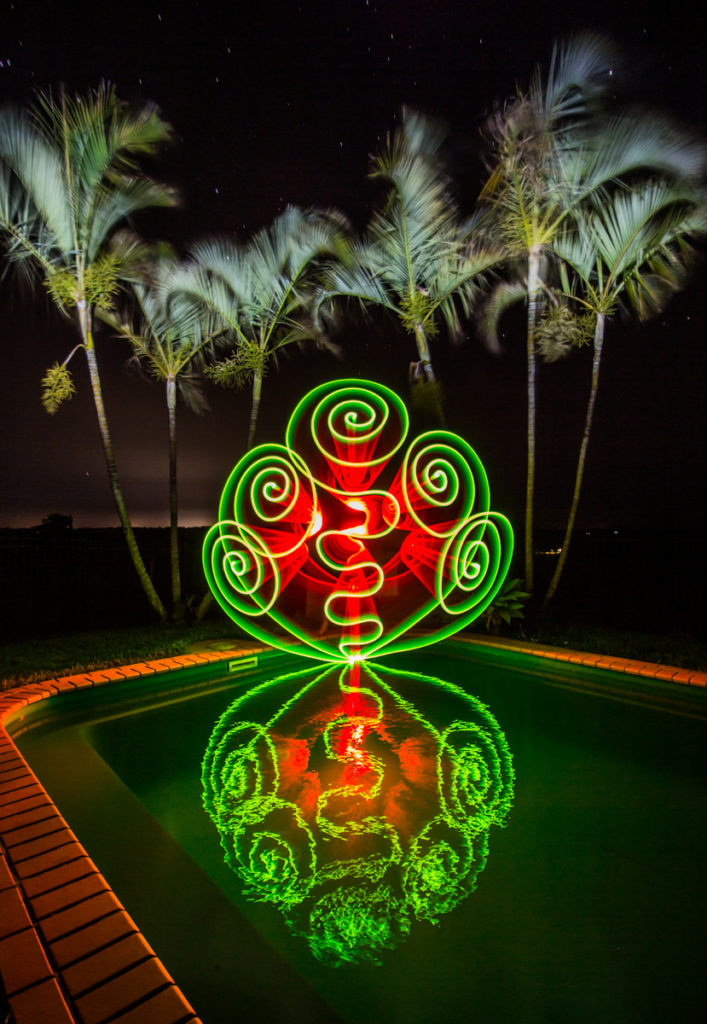
Light Painting By Rod Evans

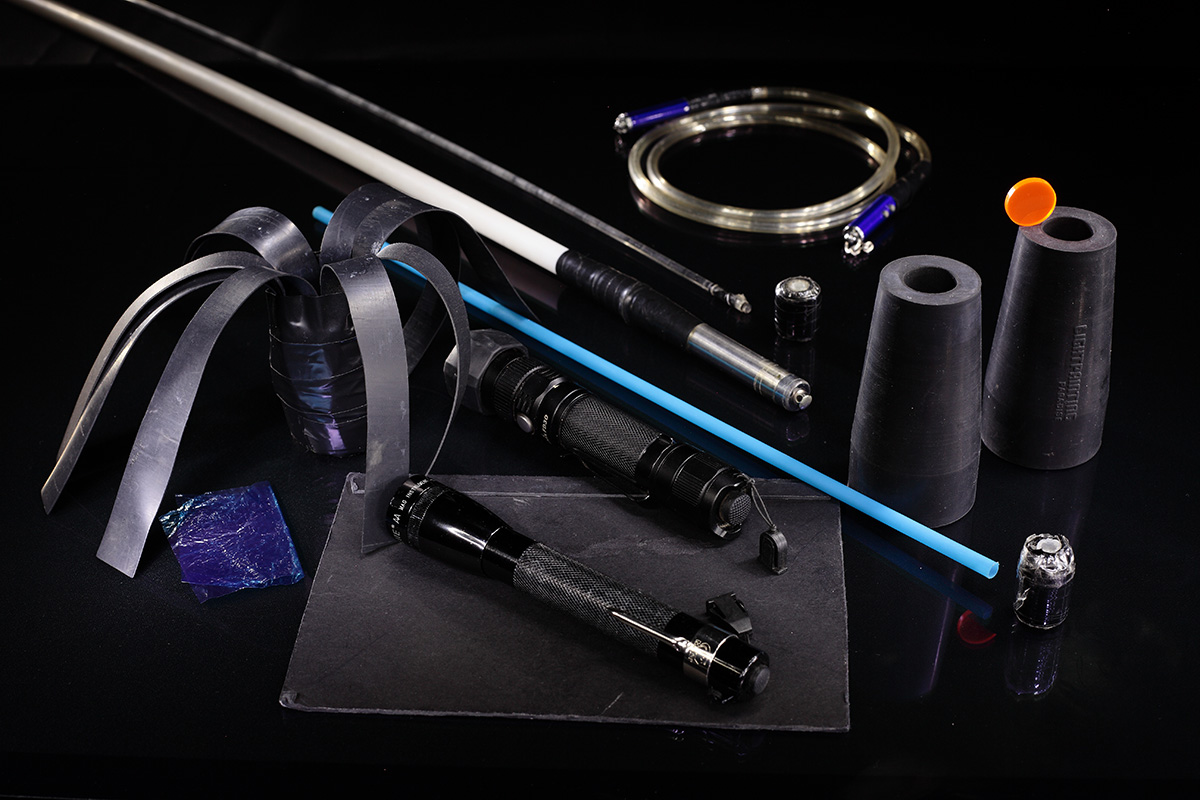
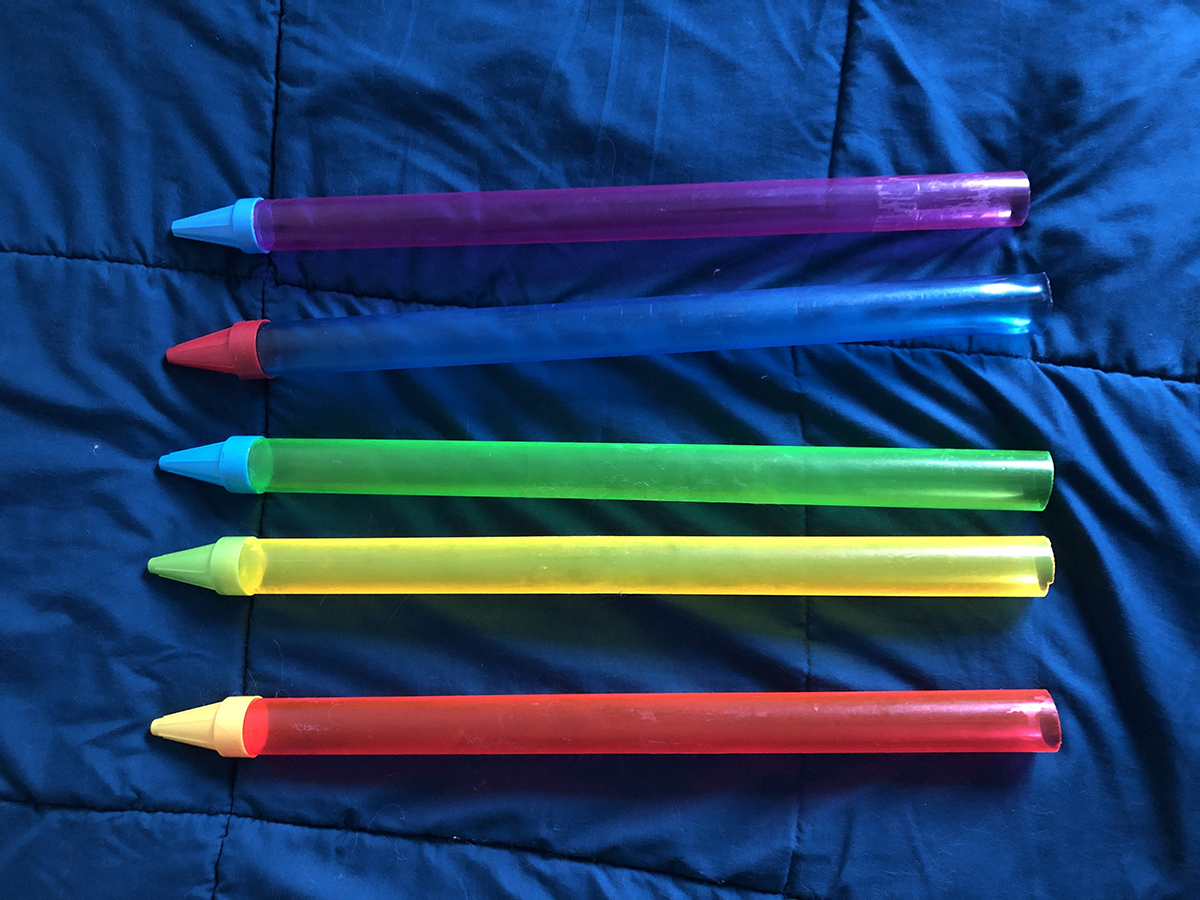
The winner of the Light Painting Photography Homemade Light Painting Tool and Image is Rod Evans for this ingenious Light Painting tool made up of  hose clamps, tube guards and empty M&M containers! Incredible how a light painter can walk trough a store and see things differently… “I wonder what that would do if I shine a light through it”

Here is what Rod had to say about his winning image and the tool he created it with!

I captured this image at the pool in my backyard (in northern NSW, Australia). The spiral design was drawn completely by hand and is a shape that I have been working on for the last year or so. Most of my attempts at this shape are not worthy of publication but if I stick with it I usually end up getting at least one good shot from a shoot. When I saw this one on the back of the camera I really liked it as it has good symmetry and a nice reflection.

Light Painting Tool By Rod Evans

The tool I built is basically a red acrylic tube with a green M&M’s container taped on the end (I chose the red and green colours for one reason only….it was Christmas!!!). I purchased several coloured acrylic tubes from China recently and I love finding things to tape on the ends for light painting. Walking through the supermarket a while ago, I noticed the M&M’s containers (in four different colours) and thought they might look good with light shone through them, so I purchased them all, cut off the lids and put them to work. I’ve since done a few shoots using the containers and they all look great. The red tube is attached to the torch using a silicon grey-water adaptor that I bought from my local hardware store. I use butterfly hose clamps to secure the tube and torch in place. Torch used was a Nitecore P26. After creating the spiral shape I then walked over to the camera and painted in the trees with my headtorch. Check out more of Rod’s awesome Light Painting work on his Instagram Account HERE!

For this winning Image Rod will receive a prize package filled with light painting tools and treasures from our sponsors COAST Flashlights, Neon Flexible, Rosco and Light Painting Brushes ! Please support these awesome companies that support our light painting art from, without them this contest series would not be possible! If you would like to enter the next Light Painting Photography contest click here for all the details. 

Light-Painting-Brushes-Banner
Rosco Labs Logo

Filed Under: Light Painting Contest, Light Painting Contest Winner, Light Painting Photography

Light Painting Contest Entries, December 2019

December 22, 2019 by Jason D. Page

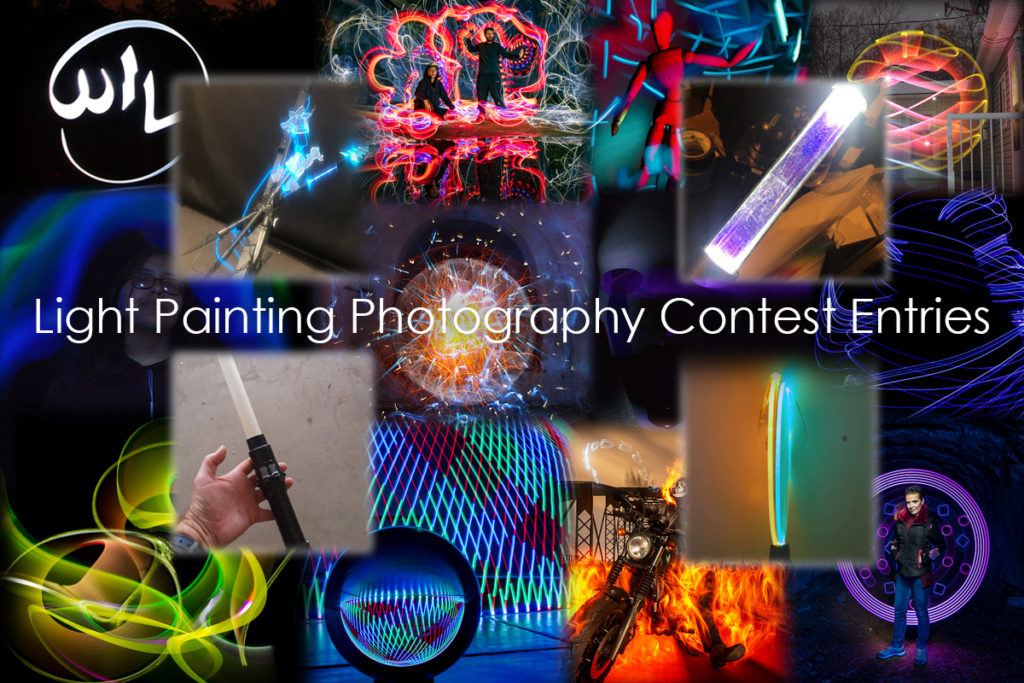
Light-Painting-Photogrpahy-Homemade-Tool-Entries Here are the entries for this months Light Painting Photography contest! The theme of this light painting competition was to create a light painting using some sort of homemade light painting tool. That means you must have created something unique or at the very least modified some off the shelf light. You will see that each image has the tool used to create it directly after it and they are numbered the same, so light painting 1 was created with tool picture 1. Please pick the 3 different images you love based on the images alone and leave your selections in the comment section of this page. Everyone PLEASE VOTE in the comment section of this page to pick your top 3 favorite images, ONLY VOTE ONE TIME. The images all have a number in the title (EXAMPLE… IF ONE OF YOUR FAVORITES IS THE IMAGE TITLED “Light Painting Photography Contest Homemade Tool 01″ THEN YOU SHOULD PUT THE NUMBER 01 AS ONE OF YOUR CHOICES). Voters must include 3 UNIQUE choices for your votes to be counted. In other words no 1,1,1, or 5,5,5, or 7,7,7,…..The voting will end December 31st, 2019 at Midnight Eastern Standard Time, Enjoy.
1
1
2
2
3
3

4
4
5
5
6
6

7
7
8
8
9
9

10
10
11
11
12
12

13
13
14
14
15
15

16
16
17
17
18
18

19
19
20
20
21
21

22
22
23
23
24
24

Light Painting By Rod Evans
Light Painting Tool By Rod Evans
26
26
27
27

28
28
28
29
30
30

31
31
32
32
33
33

34
34
35
35

As always this Light Painting Photography contest is sponsored by the coolest damn companies on the Planet COAST Flashlights, Neon Flexible, Rosco and Light Painting Brushes ! Please support these awesome companies that support our light painting art from, without them this contest series would not be possible!
Light-Painting-Brushes-Banner
Rosco Labs Logo

Filed Under: Light Painting Contest, Light Painting Photography

Russell Klimas TedX Talk

December 4, 2019 by Jason D. Page

Light Painting by Russell Klimas

Light Painting Photographer Russell Klimas hasn’t been light painting that long in the grand scheme of things but man has he made some incredible images in the last couple of years. Not only has he created some really awesome light paintings he has been busting down doors and getting his name out there! Russell’s images, innovation and work ethic are a real inspiration. He recently gave a TedX talk about Light Painting called “Light Painting: Photoshop in Real Life” It’s a great talk, check out the video below!

Filed Under: Light Painting Photography, Light Painting Video

Light Painting Tutorial, The Peacock Technique

November 26, 2019 by Jason D. Page

Light Painting Tutorial The Peacock Technique

In this Light Painting video tutorial, Light Painting Artist Jason Rinehart shares how he creates a unique light painting effect he calls the Peacock using tools from Light Painting Brushes.

Follow Jason Rinehart’s Light Painting Work at these links:
https://www.instagram.com/hartlight
https://www.facebook.com/HartLight2113/

Filed Under: Light Painting Photography, Light Painting Tutorials, Light Painting Video

New Color Fiber Optics From Light Painting Brushes

November 21, 2019 by Jason D. Page

Light Painting Brushes Fiber Optic Sample IMG_0808

Light Painting Brushes Fiber Optic Sample

We have been releasing some exciting new tools to the Light Painting Brushes line up. This is a video introduction to the New Color Fiber Optic Light Painting Tools. The Color Fiber Optics create a very unique texture of light like no other light painting tool! The length of the fiber will illuminate the color that the fibers are (Pink, Blue, Green, or Purple) while the end of the fibers will glow with the color of light that is attached to the Fiber Optic via the Universal Connector. The Color Fiber Optic Light Painting Brushes are excellent for use in Portrait Photography and everything that you can think of!

Color Fiber Optics From Light Painting Brushes:
https://lightpaintingbrushes.com/collections/color-fiber-optics

Filed Under: Light Painting Photography, Light Painting Video

Thank You Rosco our new Light Painting Photography Contest Sponsor!

November 7, 2019 by Jason D. Page

Rosco Light Painting Photography

Just a quick video to say Thank You to Rosco for supporting Light Painting Photography by becoming our newest sponsor for the completely FREE bi-monthly LightPaintingPhotography.com Light Painting Contest!

Check out how to enter the Light Painting Photography Contest here: https://lightpaintingphotography.com/light-painting-contest/current-contest-theme/

Rosco Gear in this video:
Digital After Dark Kit:
https://amzn.to/2WY6Xon
3×6 Swatch Book: https://amzn.to/2NN6KjG
Strobist Kit: https://amzn.to/2JXLF59
Gaffer Tape: https://us.rosco.com/en/product/gafftac-2in-gaffer-tape
Glow in the Dark Gaffer Tape: https://us.rosco.com/en/product/glow-tape
Cinefoil: https://amzn.to/33sWjs6

Learn More about all the awesome gear that Rosco makes here: https://www.rosco.com

Thank you to our other sponsors as well:
Light Painting Brushes: https://lightpaintingbrushes.com
Coast Flashlight: https://coastportland.com
Neon Flexible: https://www.neon-flexible.fr

Filed Under: Light Painting Contest, Light Painting Photography, Light Painting Video

Light Painting Video Art, Healing Sounds by Alain Lemay

November 6, 2019 by Jason D. Page

Light Painting by Alain Lemay

Music Composer Alain Lemay has shared his newest project pairing his beautiful music with light painting! Inspired by the “Purity of Music” Alain and his 12 Year old Grand Daughter set out to create a “an inspirational organic mood, following the music.” The images have been processed in Adobe Premiere to create a flowing melodic piece of light painting video art.  Alain said “The video file was made with 50 duplicates track of the original image. Each track is in lighten mode, opacity decreasing to make the fadeout with a mirrored effect.” This project is part of Alain’s new YouTube channel dedicated to healing music where he will be adding more Light Painting Video Art. Sit back, relax and check out the video below!

Filed Under: Light Painting Photography, Light Painting Video

Light Painting Photography Contest Winner, November 2019

November 5, 2019 by Jason D. Page

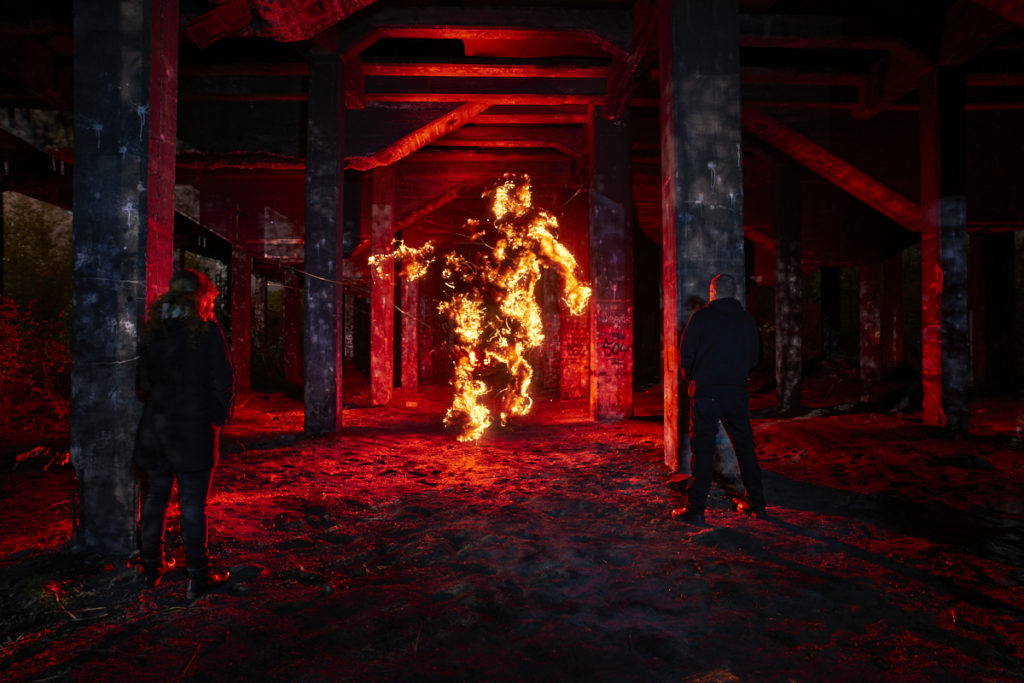
Light Painted Light Being Contest

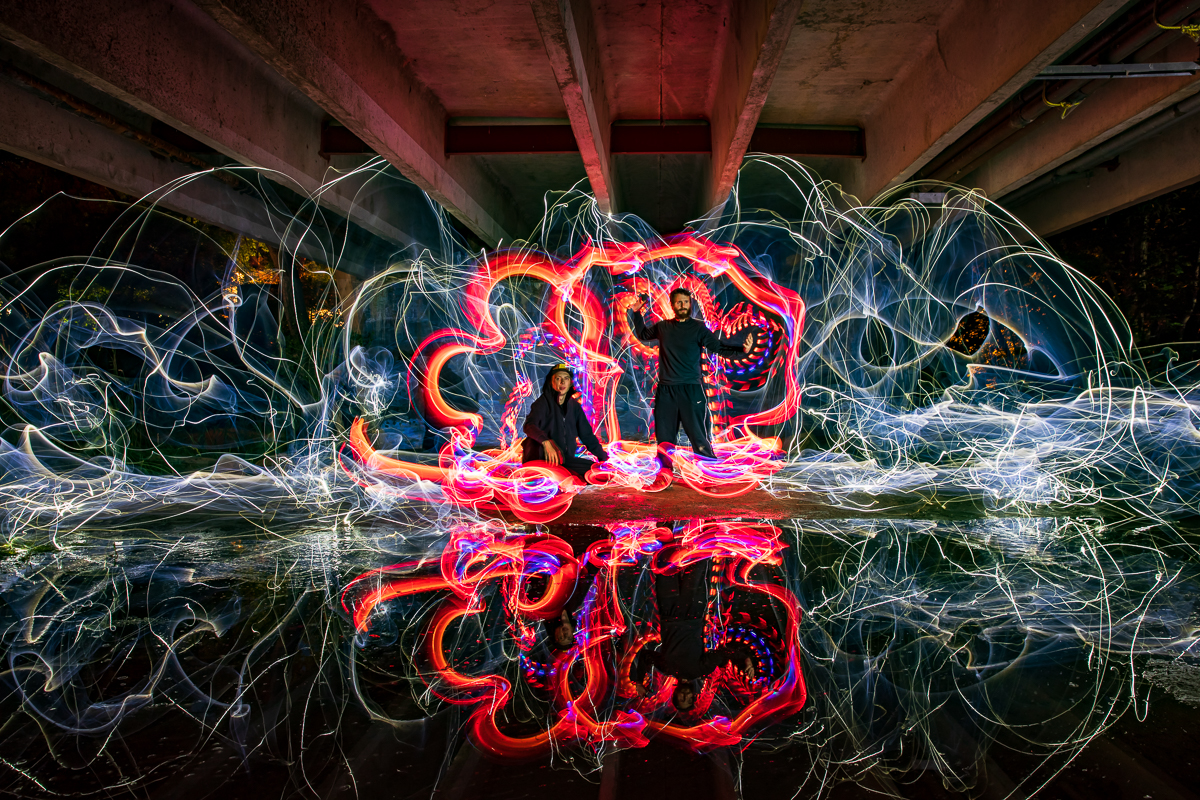
The winner of the Light Painting Photography contest titled “Light Being” is…  Dennis Berka, A.K.A Ryus Light Works, for the super cool image above! You might look at this image an wonder how the heck it was created in a single exposure, well there were a lot of steps involved as you will see from the description below! Here is what Dennis said about his complex winning image!

“The photo was created in the ruins of an old tar production building. The place is usually a swamp below the pillars you see in the photo, but one summer here was so hot that it dried up. So I decided to go there with two fellow lightpainters and try out a technique I played around with at that time. For the Fire Golem I placed a small bit of shaped steel wool on a black metal sheet and put up a tripod next to it. I used an old analog Nikkor zoom lens that had a macro setting so it was easy to set focus on the little figure. It was about the size of a smartphone. Next I positioned another tripod for the scene you see in the photo and put a manual wide angle lens on the camera. After setting the scene I drew a circle on the screen of my camera with a non permanent whiteboard marker to mark where the fire golem was supposed to appear. Back to the steel wool figure to align it to fit inside the circle on the camera screen. Once everything was prepared and my friends placed in the scene I closed down the aperture of the zoom lens nearly all the way, lit the steel wool with a lighter and started the exposure. Once it was fully burned through (with the help of a few blows of air) I capped the lens, swapped it to the wide angel and switched tripods to the one for the scene. Now cap off the wide angle lens and the only thing left to do was walk into the scene to the place where the fire golem is supposed to stand and light the scene from there in red. I used a technique that Pala Teth demonstrated a few times here hiding the flashlight from the camera. The last touch was to add a little lake blue light to the shadows of the scene to make them visible a bit more. The rest of the light came from street lanterns a little bit to the side of the place that produced a real nice texture on the pillars because it was shining through large bushes. I played around with this technique quite a lot and have refined and used it a lot of times since then to create a lot of fantastic photos that people always wonder about how they were made.”

You can check out more of Dennis’s Light Painting work on his Facebook and Instagram pages linked Below:
https://www.facebook.com/RyusLightworks
https://www.instagram.com/ryuslightworks

The Models for this image were the Light Painting Duo Night Lights: https://www.facebook.com/Nightandlights/

For this winning Image Dennis will receive a prize package filled with light painting tools and treasures from our sponsors  COAST Flashlights, Neon Flexible and Light Painting Brushes ! Please support these awesome companies that support our light painting art from, without them this contest series would not be possible!

If you would like to enter the next Light Painting Photography contest click here for all the details.

Light-Painting-Brushes-Banner

Filed Under: Light Painting Contest, Light Painting Contest Winner, Light Painting Photography

Light Painting Light Being Contest Entries, October 2019

October 23, 2019 by Jason D. Page

Light Painting Photography Light Being Contest Entries Here are the entries for this months Light Painting Photography contest! The theme of this light painting competition was Light Being. That means some sort of entity created with light! Obviously Light Being was open to interpretation and there are a few creatively different takes on what that means. Please pick the 3 different images you love based on the images alone and leave your selections in the comment section of this page. You can only vote one time or your votes will not be counted. Please read ALL the voting rules below.

Light Painted Light Being Contest
01
Light Painted Light Being Contest
02
Light Painted Light Being Contest
03
Light Painted Light Being Contest
04
Light Painted Light Being Contest
05

Light Painted Light Being Contest
06
Light Painted Light Being Contest
07
Light Painted Light Being Contest
08
Light Painted Light Being Contest
09
Light Painted Light Being Contest
10

Light Painted Light Being Contest
11
Light Painted Light Being Contest
12
Light Painted Light Being Contest
13
Light Painted Light Being Contest
15

Light Painted Light Being Contest
16
Light Painted Light Being Contest
17
Light Painting Light Being Contest 18
18

Everyone PLEASE VOTE in the comment section of this page to pick your top 3 favorite images, ONLY VOTE ONE TIME. The images all have a number in the title (EXAMPLE… IF ONE OF YOUR FAVORITES IS THE IMAGE TITLED “Light Painted Light Being Contest 01″ THEN YOU SHOULD PUT THE NUMBER 01 AS ONE OF YOUR CHOICES). Voters must include 3 UNIQUE choices for your votes to be counted. In other words no 1,1,1, or 5,5,5, or 7,7,7,…..Please pick your three favorite IMAGES based on the image alone, the voting will end October 31st, 2019 at Midnight Eastern Standard Time, Enjoy.

As always this Light Painting Photography contest is sponsored by the coolest damn companies on the Planet COAST Flashlights, Neon Flexible, LED Flexible,and Light Painting Brushes ! Please support these awesome companies that support our light painting art from, without them this contest series would not be possible!

Light-Painting-Brushes-Banner

Filed Under: Light Painting Contest, Light Painting Photography

Light Painting Brushes Universal Connector Compatible Flashlight Guide – 2019

September 23, 2019 by Jason D. Page

Light Painting Brushes Flashlight Guide

This guide written by Stephen Knight is a follow up to the 2018 guide to flashlights compatible with the Light Painting Brushes Universal Connector. Some new flashlights have been added, and a few discontinued ones removed. This article covers flashlights that fit the Universal Connector which allows for a .975″ to 1.5″ (25-38mm) head diameter range. An addition to this years guide is an asterix (*) denoting that the light has internal recharging options (i.e. you don’t need to use a seperate charger).

Foreword
It should be noted that the maximum output in lumens stated by manufacturers are rarely sustained, and most flashlights reduce in brightness at anything between 30 seconds and a few minutes. Be aware that some cheap flashlights (particularly on eBay, Amazon, various Chinese electronics companies) have highly exaggerated lumen ratings.

Whilst lumens (lm) are generally used to describe output, the peak beam intensity in candela (cd) also needs to be considered. The higher the peak beam intensity per lumen (“throwy” light), then generally the better the flashlight is for illuminating longer tools such as the Light Swords,. A lower peak beam intensity per lumen (“floody” light), then generally the better the flashlight is for more even illumination of tools such as Fiber Optic Brushes and Plexiglass blades. Zoom lights allow for more flexibility, especially for controlled illumination purposes, but are far from essential. Experimentation is the key to see what works the best.

Switch location is also something that needs to be considered so that you can turn a flashlight on or off, or change modes during a light painting scene. Most (but not all) flashlights in this article either have tail switches or accessible side switches.

AA/AAA Battery Flashlights
Lights that use commonly found AA and AAA (alkaline or rechargeable NiMH) batteries are popular with many light painters, and those new to flashlights. However maximum output is less than most li-ion battery based lights. These lights are better in darker ambient light conditions. Recommended zoom lights include the Ledlenser P7-2017 (450 lm) and MT6 (600lm), Coast G32 (355lm), G50 (355lm), HP5R (185lm), Polysteel 200 (320lm), Polysteel 400 (375lm), and TX9R (300lm). Recommended non-zoom lights include the Coast G26 (120lm), Energizer Vision HD 2AA (400lm) and 3AAA (250lm), and Zanflare F2 (200lm). The Nitecore SRT3 (180lm) is discontinued but still available in a few places. Plenty of cheap AA or AAA flashlights available from hardware stores will also fit, but won’t be particularly bright.

Li-ion Battery Flashlights – approx. 1000 lumens
Lithium ion based flashlights (usually using rechargeable 18650 batteries, but increasingly 20700/21700/26500) allow for much higher brightness, but also result in more heat. They all have lower output modes for situations when less output is more desirable, such as moonlit nights. Li-ion battery flashlights are usually much better value for money than AA or AAA based lights, but usage requires knowledge of the risks of using li-ion batteries. Bright non-zoom li-ion lights that are in the 1000 lumens range (+/-250lm) include the Convoy S2+, S3, M1, and M2, Thorfire TK15S, VG10S, and VG15S, Sofirn SP31 and SF36, Atactical/Wowtac A1S*, Thrunite TC12v2*, Eagtac P25LC2, Soonfire DS31*, Klarus XT11S*, Nitecore P10GT, P12GT, MT22C, SRT5, Nextorch TA30, Folomov 18650S*, Zanflare F1*, Olight M1X and M2T, TLF/BLF FW1A. These will usually run close to maximum brightness for at least a couple of minutes before automatic or manual brightness step-down, allowing for use in longer light painting scenes. Zoom lights that can reach 1000 lumens include the Ledlenser P7R* and MT10*, Walther Pro SL66r*, Wowtac A3S*, and Klarus FX10*.

Li-ion Battery Flashlights – 1500 to 2000 lumens
These are great in high ambient brightness situations, but can step-down in brightness after around 30 seconds due to the large amount of heat produced. These lights may (briefly) provide up to a 1 stop photographic exposure advantage compared to previously mentioned 18650 flashlights. Recommended flashlights in the 1500-2000 lumens range include the Klarus XT2CR*, XT11GT*, 360X1*, Olight M2R*, Convoy S11 and S21A.

Flashlights with mode memory
Mode memory allows a flashlight to be turned on in the previously used mode. This avoids having to fumble through modes during a light painting scene. Flashlights with reliable mode memory include the Thorfire TK15S, VG10S, and VG15S, Sofirn SP31 and SF36, Atactical A1S*, Thrunite TC12v2*, Nitecore P10GT, MT22C, SRT5, and Folomov 18650S*.

Flashlights with momentary switches
Momentary switches (also known as “forward clicky”, “tactical”, or “temporary” switches) allow for more control over on and off, with a half press of the switch. These are very useful for light drawing or light writing. Lights with momentary on high mode only include the Ledlenser P7.2 and P7-2017, Olight M2R* and M2T, Klarus XT2CR*, XT11GT*, 360X1*, and FX10*.

Lights with momentary on all memorised (non-flashing) modes, allows for momentary functionality to be used in a range of different ambient lighting conditions, making the lights much more useful. Flashlights with this functionality include the Thorfire TK15S and TK18, Sofirn SP31, Atactical/Wowtac A1S*, Soonfire DS31*, Thrunite TC12v2*, Fenix PD35TAC, plus the Nitecore P10GT, P12GT, MT22C and SRT5.

For lights that additionally have momentary for single frequency strobe, keep reading…

Light Painting by Stephen Knight

Using momentary switches for creating bubble effects.

Flashlights with Strobes
Flashing modes can add to the creativity in light painting scenes. Lights with single frequency strobes are generally preferred by light painters. Options include the Convoy S2+ (10Hz with older 3/5 mode user interface), Convoy T2 (7.5Hz), Thrunite TC12v2* (12.5Hz), Atactical/Wowtac A1S* (12.5Hz), Zanflare F1* (10Hz), Ledlenser M7RX* (20Hz), plus Walther Pro PL50, PL55r*, PL60, and SL66r* (20Hz).

A few flashlights have a bike flash mode that can create interesting pulse effects. Examples are the Convoy S2+ Desert Tan (with newer Biscotti user interface), Thorfire TK15S and TK18, and the TLF/BLF FW1A.

The combination of single frequency strobes and momentary functionality allows for fantastic creative control. Flashlights with both include the Olight M1X, M2R* (9Hz), Nitecore P10GT (10Hz with 33% on time), Nitecore MT22C (19.5Hz with 33% on time), Nitecore SRT5 (22Hz with 25% on time), Nextorch TA15 and TA30 (10Hz). The Light Excursion Deluxe RGB has momentary control for strobes in multiple colours (up to 6Hz with 25% on time). The Nitecore P10GT and MT22C can also be controlled by remote pressure switches for more creative freedom. The TLF/BLF FW1A has variable strobe frequency, choice of different strobe modes, and new models include momentary functionality, but is only suitable for advanced li-ion flashlight users.

Light Painting by Stephen Knight

Flashlights with momentary function on any mode and strobe are useful for light drawing.

Flashlights with Rotary or Ramping Controls
Rotary or ramping controls allow for fine adjustment of brightness. These flashlights also have momentary functionality too! Options include the Thorfire TK18 (ramping), Nitecore P26, MT22C (rotary dial), SRT3, and SRT5 (rotary head). However you need to be careful with the P26 and MT22C that the dial does not turn when pushing the light into the connector.

RGB / Colour Changing Flashlights
Many light painting tools are available with, or can be used with high quality colour gels or filters, reducing the need for flashlights with coloured LEDs. However, colour changing flashlights can add to creativity. Lights with colour changing (but not colour mixing) options include the popular Ledlenser P7QC (RGBW), Ledlenser T2QC (RGBW), and Coast TX100 (RW-Cyan). The Light Excursion Sport RGB(W) has momentary controls for individual RGB(W) channels, which can be combined for some colour mixing. Lights with single colour LEDs include Jaxman E2L Color (R,G,B,Y) and Maglite XL50 Spectrum Series (R,G,B).

Light Painting by Stephen Knight

Light tunnel created with a Concentrate C5 and Ledlenser P7QC.

Colour mixing flashlights allow for a range of colours, and various colour effect modes. The lumen (lm) ratings below have been tested using RGB all on 100% output, but buyers need to be aware that many manufacturers exaggerate the lumen ratings. The Light Excursion Deluxe RGB light (100lm) is proving very popular with light painters, as it is brighter than most other RGB colour mixing lights, has lots of effects modes, plus rotary dimmer and momentary switch. The Ignis Shop Color RGB Torch* (150lm) is a bit brighter, has the same effects modes, is rechargeable, and has a more simplistic user interface. The Concentrate by Threeworlds C5 (30lm, requires padding to fit in the Universal Connector) is not very bright, has a tricky user interface, but allows for easily programmable effect modes. The Color Shine flashlight (30lm) is cheap, dim, and unreliable. It is also re-badged by quite a few different companies. Other options that I haven’t tested, but worth considering include the Neon Saber T1000, the flashlight module from the Fiberflies Pixelwhip, or the flashlight module from the GloFX Space Whip Remix. Antsonamelon are also launching their new RGB Critter flashlight on Kickstarter in October 2019.

RGB Flashlights

Selection of RGB flashlights – L to R – Ledlenser P7QC, Concentrate C5 (with padding), Color Shine Flashlight, Light Excursion Deluxe RGB, Ignis Shop Color RGB Torch.

Neutral and Warm White Flashlights
Most flashlights are available in cool white tint (approx. 6500k CCT), which can be quite harsh. If you want a more “daylight like” beam, which is much better for illumination purposes, or warmer light trails, then look for flashlights with neutral white tint options (4000-5500k CCT). Examples are the Thorfire VG10S and TK15S, Sofirn SP31 (V1), Olight M2R*, Thrunite TC12v2*, Energizer Vision HD lights, Zanflare F1* and F2, Jaxman E2, E2L and M2 (which include high CRI options), plus the Convoy S2+, M1, M2, T2, and zoomable BD4* (choose xx-3x or xx-4x / 4000-5000k options).

Flashlights with warm white (3000k CCT) LEDs are much more rare, but are available in most lights made by Convoy (choose xx-7A / 3000k option), Sofirn SF36W, and the zoomable Maglite XL50 Spectrum Series warm white model.

Flashlights

Selection of bright flashlights – L to R – Nitecore P10GT, Klarus XT2CR, 3 Convoy S2+ (in cool, neutral, and warm white), 2 Thorfire TK15S.

Conclusion
There is a large number of flashlights that will fit the Light Painting Brushes Universal Connector, at all price points. Hopefully this guide will assist those looking to purchase one or more flashlights that will meet their light painting needs.

Filed Under: Light Painting Photography

« Previous Page
Next Page »

Copyright © 2026 · News Pro Theme on Genesis Framework · WordPress · Log in