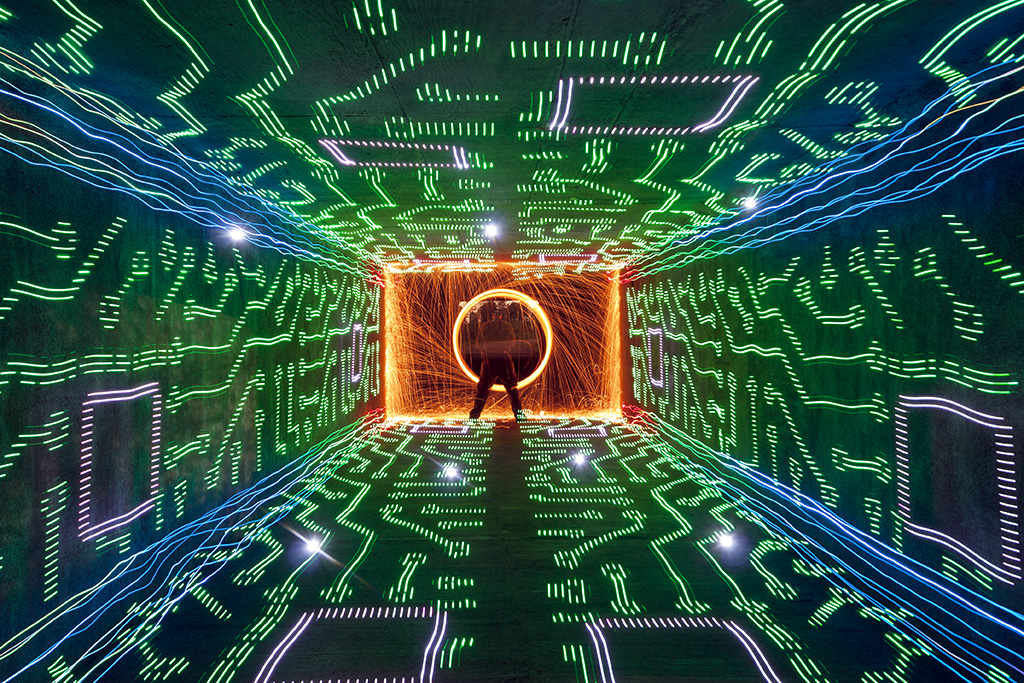
From time to time we come across a light painting and just stare it wondering how the F@#! did they do that?!?! Break Down is a series if which I only ask the artist one question “How the F@#! did you make this” its up to the artist to tell as little or as much as they want. For this Light Painting Breakdown Johnny Dickerson talks us through how he created the above image titled “Onboard Memory”
So Johnny how the F@#! did you make this?
Originally, I had the idea that I wanted to create a shot where it looked like I was completely immersed inside a computer. The only way I thought that I could it, is to make a “tunnel” of light using the Digital Light Wand (Editor Note: The Digital Light Wand was created by Michael Ross and was the predecessor to The Pixelstick) and have me at the end. I first tried to create it in my backyard with unsatisfactory results.

The walls did not line up like I would have liked, and there was no way to make the ceiling line up right with the walls. I even tried nailing down some string in the ground to give me a straight line to work with. It still was not acceptable with what I had in mind, so I put the idea to the side for awhile.
Flash-forward several months, while out scouting for potential areas to light paint, I came across a bike tunnel that was about 12 feet wide by 8 feet high and about 200 feet in length.

There was not (and still to this day) any lights in there; which makes it perfect to light paint in. It’s completely dark for the most part, except for a warehouse floodlight that spills in a little, but you can shoot further down and avoid it’s light pollution. This is what it looks like when you shoot straight down the middle.

I thought I just hit the jackpot for light painting! Even to this day, I refer to it to my light painting buddies around town as just “the tunnel”, they know. I was ready to try my idea of being immersed inside a computer.
I had a pattern of a computer that I used for the Digital Light Wand and decided to walk down the tunnel against the wall.

By using the walls of the tunnel to walk down, the pattern lined up exactly how I wanted it! I later came to realize how dark it was in there and needed a reference point from where I needed to start light painting. I found a fairly large rock outside and placed it halfway through the tunnel in the corner. So, when I start the exposure, I slowly walk to the rock and start light painting at the same spot every time. For the shot “Onboard Memory”, I walked the Digital Light Wand against each wall, twice on the floor, and twice on the ceiling making 6 passes. Realizing there was nothing in the corners to “connect” the DLW passes, I decided to make a pass with the LEDs on a bike tire (made well known by TCB).

Once I seemed up the corners, I went back to where the rock was and spun some steel wool. To top it off, I created some flares by just shining a flashlight at the camera for a couple of seconds, hoping the flares would line up with some of the computer pattern.
So obviously this is amazing work but Johnny also sent in a few others that are absolute JAW DROPPERS that were created very much in the same way, check these out!


If you are not following Johnny’s work you are missing out. Be sure to check out his website, his Facebook page for more incredibleness!
Lars says
Nice idea this “memory board”. It seems that you used a pixelstick 😉
Johnny says
This was taken with what is called the Digital Light Wand, created by Michael Ross in 2009, I think. It was the predecessor to the PixelStick.
Tim says
Nice 1 fella. Cracking write up and a stand out piece. Tidy stuff.