Light Painting Photography

For the promotion and progression of Light Painting Art and Artist.

  • Home
  • Blog
  • History
  • Artists
    • Dean Chamberlain
    • Eric Staller
    • Susan Sims-Hillbrand
    • Vicki DaSilva
    • David Lebe
    • Troy Paiva
    • Bruno Mesrine
    • Chanette Manso
    • Patrick Rochon
    • Aurora Crowley
    • LAPP-PRO
    • JanLeonardo
    • Lightmark
    • Arturo Aguiar
    • Pete Eckert
    • Trevor Williams
    • Michael Bosanko
    • Jason D. Page
    • Nocturne
    • Brian Hart
    • Jeremy Jackson
    • Janne Parviainen
    • Jadikan-LP
    • Dana Maltby
    • Lichtfaktor
    • Dennis Calvert
    • TigTab
    • Hannu Huhtamo
  • Tools
    • Light Painting Brushes Starter Kits Introduction
    • Fiber Optics Light Painting Tools for Photography
  • Tutorials
    • Beginner Light Painting Tutorials
    • Light Painting Tutorials by Artists
    • Light Painting Tool Tutorials
    • Kinetic Light Painting Tutorials
    • Light Painting with Fire Tutorials
    • How To Light Paint A Flower
    • Light Painting Photography Tutorial: The Spiked Orb
    • How To Light Paint a Faberge Orb!
    • No More Orb Feet – Light Erases Darkness
    • The Tinfoil Light Painting Technique
    • How To Light Paint A Ghost
    • Electric Orb Light Painting Tutorial
    • Spirographs and Physiograms Tutorial
    • On Camera Light Source
    • Off Camera Light Source
    • Orb Techniques
    • Steel Wool Tutorial
    • Custom White Balance
    • Omnidirectional Light Cap
    • Gel Holder
    • Simple Orb Tool
    • 4 Ways to Add Color to your Plexiglass Light Painting Brushes
    • Driving Shots at Night
    • Wire Wool Spinning
    • El Wire Tutorial
    • Light Stencils
    • Orbs
    • Dome Tutorial
    • Battery Operated Cathode
    • Light Wheel
    • Double Wheel
    • Fire Wall Tutorial
    • Fire Rain Tutorial
    • Smoke
    • How To Light Paint with the Polaroid One Step +
    • How To Focus In The Dark
    • Light Painting Tutorial The Peacock Technique
    • How To Shoot Defocused Fireworks Tutorial
    • Drone Light Painting Tutorial
    • Light Stencil By Trevor Williams
    • Andrew Whyte Dome Tutorial
    • Light Painting Workshop by Patrick Rochon
    • Rob Turney Refractographs
    • SpiroJib by Johnny Griffin
    • Lens Swap Light Painting Tutorial
    • Camera Rotation Light Painting Tutorial
  • Videos
    • Light Painting Documentaries
      • Jason D. Page Documentary
      • Ball of Light
      • Night Photography: Finding Your Way In The Dark
      • Lightpainted Reality
      • SeeMe | In Focus : Pete Eckert
      • Pete Eckert – Dancing on The Edge of Perception
    • Dean Chamberlain
    • Vicki DaSilva
    • Patrick Rochon
    • Lichtfaktor Light Painting Videos
  • Terms
  • Links
  • Connect With Us!
  • About
You are here: Home / Light Painting Photography / Light Painting Refractograph Tutorial

Light Painting Refractograph Tutorial

March 18, 2013 by Jason D. Page

Refractography Tutorial

Light painting photographer Rob Turney uses light, refraction, and long exposure light painting techniques to create some awesomely abstract and colorful works of art like these.
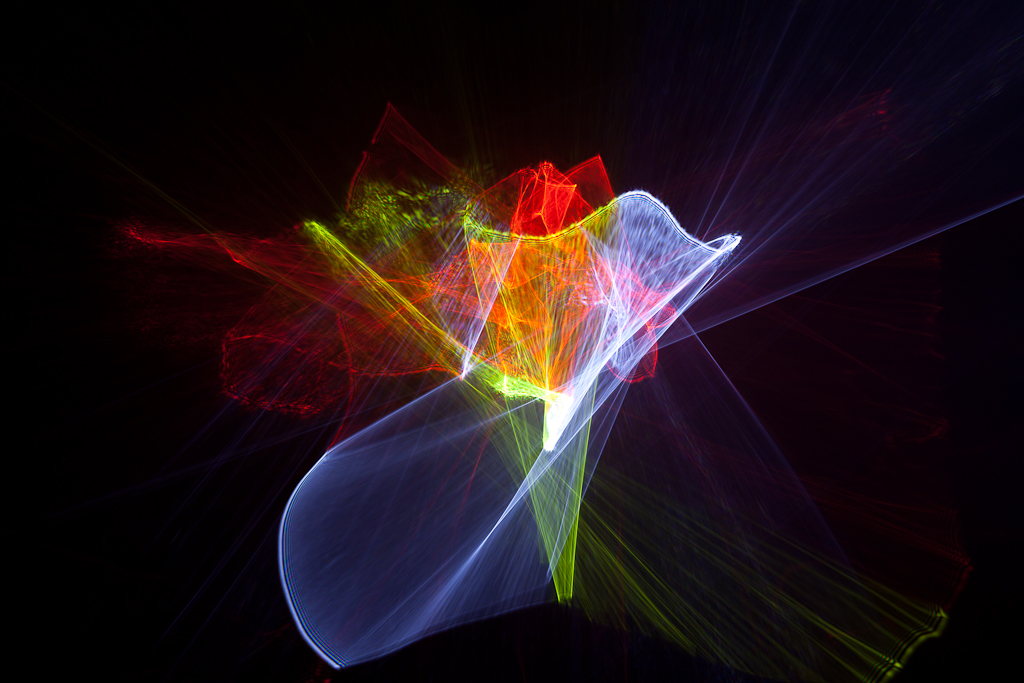
Refractograph Light Painting Tutorial

I contacted Rob and asked how the F#@!??? He said if I stopped cursing at him he would put together a tutorial to show the rest of us how…. a few weeks later and boom, we have this gift from Rob! A detailed tutorial how to create Refractographs just like Rob and Rob’s inspiration Mr. Alan Jaras. Thank you Mr. Turney you are awesome!

Refractograph Tutorial from Rob Turney on Vimeo.

Filed Under: Light Painting Photography, Light Painting Video

Comments

  1. Jon says

    May 3, 2013 at 6:21 pm

    No this isnt awesome it is a blatant attempt at self promotion with no or little attribution to those above him in this field. He attempts to indicate he invented this and is the best at it. This is so far from the truth and he has already been surpassed by some after his video. Spoonfeeding the masses at its absolute best. We cant be bothered learning for ourselves. Please tell us how to do this in 2 mins and then we can go back to sleep. A shame because he was actually above the game until now.

  2. Stephen says

    April 10, 2013 at 3:22 am

    Very interesting and amazing, can you tell me approximately the Speed, Aperture & ISO you were using for your Refractograph photos ?

  3. Janis says

    March 18, 2013 at 7:20 pm

    Amazing pictures!

    Just have couple of questions, wouldn’t the reflections that go into the camera damage the sensor ?

    Will the sensors not get dirty by leaving the camera open for a long time ?

    Thanks.

    • Jason says

      March 18, 2013 at 7:34 pm

      lasers WILL damage your sensor, standard flashlights should not cause any damage. and yes your camera will get dirty eventually from leaving the lens off.

      • Janis says

        March 19, 2013 at 11:53 am

        Thanks.

      • Bill Debley says

        June 13, 2013 at 6:09 pm

        To keep your sensor cleaner, preview you refractive pattern by placing a piece of photo-paper, the size of your sensor, on a body cap for your camera. With the light source closer to the glass object the pattern, your composition, will appear on the sensor sized patch on the body cap. Adjust the object’s rotation, angle, light source distance, etc. until you get the composition you like. This can take several minutes for an object you are not familiar with.
        Then remove the body cap and move you camera in about an inch and a half. This will put the sensor at about the same position as the paper was. You may wish to realign slightly. This should only take a few seconds. Now, ckeck your exposure time and take your shot. Light paint if you wish!

  4. Chukos says

    March 18, 2013 at 5:12 am

    Thank you Rob – I was amazed of your tutorial, very clear to understand!

Copyright © 2025 · News Pro Theme on Genesis Framework · WordPress · Log in